
Usage: for New Customer
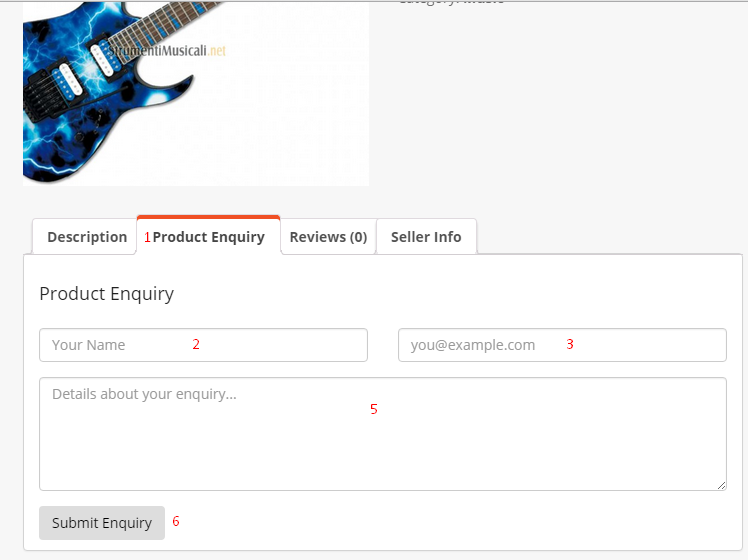
With Product Enquiry customers are able to see a new button on a product page. This button is to send email for product enquiry and for that they have to complete the following steps below.
- Product Enquiry button: Click this button to perform an enquiry.
- Name Field: Write down the name here.
- E-mail field: Insert their (customer) email ID.
- Text Field: Write details about an enquiry.
- Submit Enquiry: Click here to submit the enquiry.
Usage: for Regular/Previous Customer
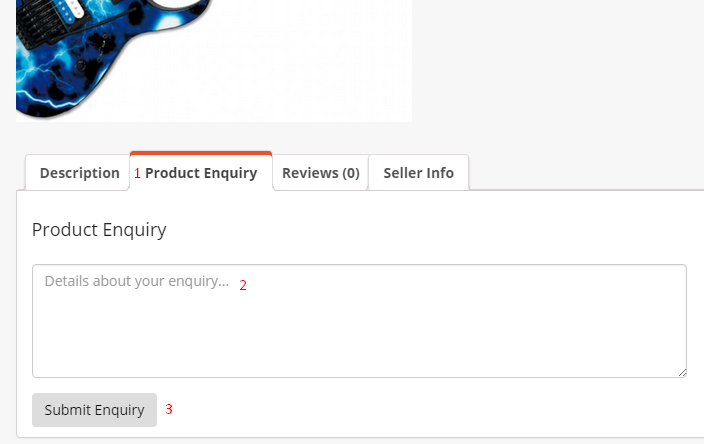
For the regular or previous customer it’s more easy to enquiry. The Product Enquiry module automatically generate their name and email ID so they have to complete following steps below.
- Product Enquiry button: Click this button to start an enquiry.
- Text Field: write details about the enquiry.
- Submit Enquiry: Click here to submit the enquiry.
How they communicate
After submitting enquiry, an email will send directly to the seller’s email account. Then the seller can reply to the customer and ensure them about the product.
If you have any feature requests or having difficulty to understand this please let us know at info@hatchaholics.com